How Does AI Facial Recognition Attendance Work?
An employee attendance system that uses facial recognition can record employee check-ins and check-outs by verifying a person's face against previously enrolled information. Instead of relying solely on a card or manual entry, the system uses a camera and facial recognition software to help confirm identity.
This technology can make attendance tracking more convenient, but its performance depends on the camera, lighting, recognition algorithm, system configuration, and integration with attendance management software.
If you are considering a facial recognition attendance system for your business, it is important to understand how the technology works, what its limitations are, and whether you need a smart camera, a dedicated time attendance device, or a broader software solution.
What Is an AI Camera for Employee Attendance?
An AI camera can capture images and, depending on its capabilities, support image analysis or other computer vision tasks. However, not every AI-enabled camera can identify employees or record attendance on its own.
A complete facial recognition attendance solution requires compatible hardware, recognition software, employee enrollment data, and a process for recording attendance events.
In some systems, the camera and recognition technology are integrated into a dedicated time attendance device. In other setups, a compatible webcam or camera provides images that software processes.
The key distinction is that capturing a face is not the same as recognizing a person or recording their attendance.
How Does Facial Recognition Attendance Work?
A typical facial recognition attendance process involves five stages.
1. Employee Enrollment
Employees are registered in the system before they can use facial recognition for attendance. Depending on the product, the system may store facial images, biometric templates, or other data required for recognition.
Enrollment should be handled according to the organization's privacy and information security policies.
2. Face Capture
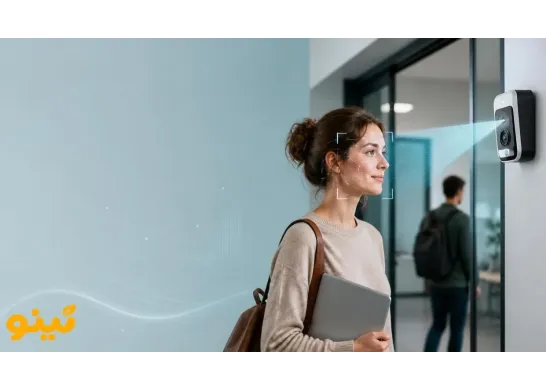
When an employee arrives or leaves, a camera captures an image of their face. Image quality, camera distance, lighting, and the person's position can affect the result.
3. Facial Analysis and Matching
The recognition software analyzes distinguishing facial features and compares them with enrolled data. The system then evaluates whether the match meets its configured confidence threshold.
The exact process varies by product and implementation.
4. Attendance Recording
If the identity is accepted and the required conditions are met, the system records the check-in or check-out event. The attendance data can then be used in reports and workforce management processes.
5. Handling Recognition Errors
Facial recognition is not infallible. If the system cannot recognize an employee correctly, the organization should have a practical fallback process, such as an alternative attendance method or a review by an authorized administrator.
Benefits of Facial Recognition Attendance
Less reliance on cards and manual entry. Where supported, employees can verify their identity without presenting a physical card or entering attendance information manually.
A simpler check-in process. A properly configured system can make attendance recording more convenient, particularly in workplaces with defined entry points.
Integration with attendance management. When connected to attendance software, recorded events can be incorporated into reports and broader workforce management workflows.
Reduced dependence on transferable credentials. Facial recognition can reduce reliance on cards that might be passed between employees. The actual security level, however, depends on the device and its verification features.
Limitations, Accuracy, and Privacy
Facial recognition does not guarantee perfect accuracy. Poor lighting, image quality, face angle, camera placement, and algorithm performance can all affect results. Businesses should evaluate the system in their actual working environment rather than relying only on advertised accuracy figures.
Biometric information also requires careful handling. Before implementation, organizations should determine what information is collected, where it is stored, who can access it, and how long it is retained. Employees should be informed about the process, and an alternative method may be necessary for people who cannot use facial recognition.
When evaluating a product, ask whether it supports liveness detection, how biometric data is protected, and what happens when recognition fails. Do not assume these features are included simply because a product is described as AI-powered.
AI Camera vs. Facial Recognition Time Attendance Device
A camera captures images. A dedicated time attendance device may combine a camera, facial recognition software, an interface, and attendance recording capabilities in one unit.
The exact features depend on the product.
If you plan to buy a facial recognition time attendance device, evaluate more than the recognition feature itself. Consider user capacity, check-in speed, software integration, reporting, alternative identification methods, support, and maintenance costs.
If you intend to use an existing webcam or camera, verify that the attendance software supports the hardware and provides the recognition capabilities you need. A standard camera alone is not a complete attendance system.
What Should You Look for in an Employee Attendance System?
Before selecting a solution, consider the following factors:
- Workforce size: Choose a system that can handle the number of employees and expected attendance volume.
- Installation environment: Lighting, camera positioning, and the number of entrances can affect usability.
- Fallback options: Employees should have another way to record attendance when the camera or recognition process fails.
- Software integration: Check how attendance data is transferred to reporting and workforce management tools.
- Data security and privacy: Review data storage, access controls, retention, and deletion policies.
- Total cost of ownership: Include the price of hardware, installation, software, maintenance, and support.
Is Facial Recognition Attendance Right for Every Business?
Not necessarily. A dedicated facial recognition device may be worth considering for factories, larger organizations, and workplaces with defined entry points.
Businesses with field employees or multiple work locations may need GPS, mobile attendance, or a combination of methods instead.
The best employee attendance system is one that fits the organization's workforce, supports reliable attendance records, protects sensitive information, and provides a practical alternative when recognition fails.
Explore Tino's Attendance Management Options
Tino's official materials describe several attendance methods, including QR code, GPS, Wi-Fi, webcam, and devices featuring face and fingerprint recognition. The exact capabilities and compatibility should be confirmed for the specific hardware and software setup.
If you are evaluating employee attendance systems, review Tino's attendance management features and available devices before deciding which solution fits your organization.
- Explore the software: Tino Attendance Management
- Get started: Sign Up for Free
Compare the available options with your workforce requirements before purchasing a device or committing to a system.
FAQ
How does AI facial recognition attendance work?
A camera captures an employee's face, and the recognition software compares relevant facial features with previously enrolled data. If the identity is accepted and the required conditions are met, the system records the check-in or check-out event.
Can any AI camera be used for employee attendance?
No. The camera must be compatible with the attendance software and support the image capture and processing requirements of the system. An AI camera alone does not necessarily provide identity verification or attendance recording.
What should I consider when buying a facial recognition time attendance device?
Consider employee capacity, recognition performance in real workplace conditions, check-in speed, software integration, biometric data security, alternative verification methods, maintenance costs, and technical support.
Is facial recognition attendance always accurate?
No. Lighting, camera angle, image quality, and algorithm performance can affect recognition results. Test the system in the actual workplace and establish an alternative process for failed recognition attempts.
Is facial recognition attendance suitable for every business?
No. It may be suitable for workplaces with defined attendance points, while businesses with field employees or multiple work locations may benefit more from GPS, mobile attendance, or a combination of methods.