2026-06-25Admin
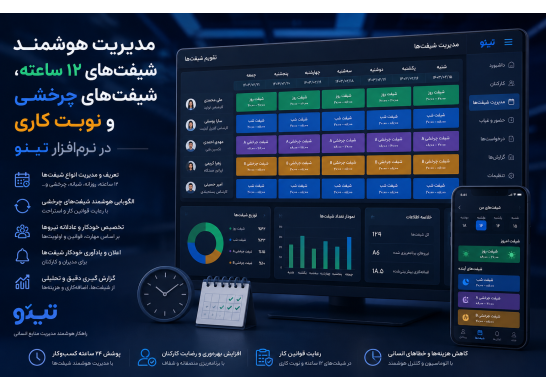
Shift management is one of the most complex areas of human resources, especially in organizations that deal with 12-hour shifts, rotating shifts, night shifts, mixed shifts, and variable work patterns. These work models are commonly found in the following industries:
• Factories
• Hospitals
• Call centers
• Power plants
• Oil and gas industries
• Security centers
• 24-hour service companies
In such environments, shift management, if done manually, can lead to:
• Scheduling errors
• Employee dissatisfaction
• Attendance discrepancies
• Overtime miscalculation
• Legal issues with shift work
• Reduced productivity
By providing an intelligent and flexible system, Tino software manages these shifts completely automatically, accurately, and error-free.In this section, we will examine the three main pillars of shift management in Tino:
1. Defining and managing 12-hour shifts
2. Managing rotating shifts
3. Shift management and legal rules
1. Managing 12-hour shifts in Tino
12-hour shifts are one of the most common work patterns in manufacturing and service industries. These shifts are usually implemented as:
• 12 hours a day
• 12 hours a night
• 24 hours a day
or similar patterns.
Tino manages these shifts in a completely intelligent way.
1.1. Defining a 12-hour shift with specific rules
In Tino, you can define a 12-hour shift in full detail:
• Start time
• End time
• Break time
• Overtime calculation
• Night work calculation
• Holiday work calculation
• Entry and exit rules
This means that each organization can create its own 12-hour shift.
For further reading: Definition of a 12-hour shift
1.2.Automatic calculation of night work and overtime
In 12-hour shifts, part of the shift usually falls within the night work period. Tino automatically calculates:
• Night work hours
• Overtime hours
• Holiday work hours
.
These calculations are performed in full compliance with labor law.
For further reading: Night work calculation
1.3. Managing entry and exit in long shifts
In 12-hour shifts, employees may:
• Come in later
• Leave earlier
• Take a break in the middle of the shift
Tino accurately manages these items:
• Late registration
• Early departure registration
• Break registration
• Calculation of actual work
2. Managing rotating shifts in Tino
Rotating shifts are usually implemented as:
• Morning → Evening → Night
• Day → Night → Break
• 2 days morning → 2 days evening → 2 days night
or similar patterns.If these shifts are managed manually, the possibility of errors is very high. Tino has fully automated this process.
2.1. Defining rotation patterns
In Tino, rotation patterns can be defined as:
• Weekly
• Monthly
• Periodic
• Custom
.
For more information: Rotational Shift
2.2. Automatic assignment of shifts to employees
After defining the pattern, Tino automatically assigns shifts to employees:
• Without the need for manual entry
• Without errors
• By observing shift rules
This feature is very vital for large organizations.
2.3. Preventing shift overlap
Tino intelligently checks:
• Does the employee have two consecutive shifts?
• Has sufficient rest time been observed?
• Do the shifts conflict with work rules?
If there is a problem, the system warns.
3.Shift Management and Legal Regulations
Shift work is one of the most sensitive areas of labor law. By law, employees who work rotating or night shifts must receive:
• Shift overtime
• Night overtime
• Holiday overtime
.
Tino calculates these completely automatically.
3.1. Shift overtime calculation
Tino calculates shift overtime based on shift type:
• Morning / Evening
• Evening / Night
• Morning / Evening / Night
.
Read more: Shift overtime
3.2. Night overtime calculation
If part of the shift is between 22:00 and 6:00, Tino automatically calculates night work.
3.3. Full compliance with labor laws
Tino guarantees:
• No shifts are illegal
• Rest hours are observed
• Shift work is calculated correctly
4.Fully automate shift scheduling in Tino
One of the biggest challenges for multi-shift organizations is scheduling shifts. If this is done manually, the probability of errors is very high:
• Shift overlap
• Shortage of staff at certain hours
• Unwanted overtime
• Employee dissatisfaction
• Labor law violations
Tino has fully automated this process.
The article 7 Big Challenges of Recording and Monitoring Employee Attendance and Absence in Shift Companies can help you further.
4.1. Automatically generate shift schedules based on templates
After defining shift patterns (12-hour, rotating, shift work), Tino can:
• Weekly shift schedules
• Monthly shift schedules
• Periodic shift schedules
Automatically generate.
For more reading: Automatic shift scheduling
4.2.Smart Shift Allocation to Employees
When assigning shifts, Tino checks the following:
• Number of workers required
• Required skills
• Legal restrictions
• Rest hours
• Rotation patterns
• Leave requests
This means that no shift is registered without careful review.
4.3. Ability to transfer shifts with manager approval
Employees can:
• Request to transfer shifts
• Request to swap shifts with a colleague
• Request to change work days
Register. The manager can approve or reject it.
For more reading: Employee shift changes
5. Error control and prevention of discrepancies
One of the most important features of Tino is smart error control. This feature ensures that no illegal or irregular shifts are registered.
For more reading: How does payroll software reduce calculation errors for shift and contract workers to zero?
5.1.Preventing Shift Interference
If an employee:
• Has two consecutive shifts
• Has less than the allowed rest time
• Has shifts in two different units at the same time
Tino warns and does not allow registration.
For further reading: Shift Interference Control
5.2. Control of Shift Work Rules
Tino checks:
• Are the shifts in accordance with labor law?
• Is shift work calculated correctly?
• Are night work hours observed?
If there is a discrepancy, the system warns.
5.3. Control of shift overlap with leave and mission
If an employee:
• Has a leave
• Has a mission
• Has an absence registered
Tino does not allow registration of a shift for that day.
For further reading: Control of leave and shift
6. Shift coordination with attendance and functionality
One of the most important advantages of Tino is the complete integration of shifts with attendance.This means:
• Shifts are not just on paper
• Actual attendance is compared to the shift
• Accurate performance is calculated
6.1. Comparing check-in and check-out with shift
Tino automatically checks:
• Did the employee check in during the shift?
• Did he / she check out according to the shift?
• Did he / she leave late or leave early?
Read more: Comparing shifts and attendance
6.2. Automatic calculation of actual performance
Actual performance includes:
• Useful working hours
• Overtime hours
• Night work hours
• Holiday work hours
• Shift work hours
. Tino calculates all of these automatically.
6.3. Integration with time and attendance devices and apps
Tino is compatible with all time and attendance recording methods:
• Time and attendance devices
• Mobile apps
• QR Code
• Geofencing
• Web-based panels
This means there will be no discrepancies between shifts and attendance.
7.Shift Productivity and Performance Analysis
One of the most important advantages of Tino is that it does not just manage shifts; it also analyzes shift performance so that managers can make more accurate decisions.
7.1. 12-Hour Shift Productivity Analysis
Tino analyzes the following data for 12-hour shifts:
• Useful working hours
• Lateness rate
• Early departure
• Actual overtime
• Night work
• Holiday work
These analyses help managers understand:
• Which shifts are more productive
• Which shifts cause employee burnout
• Whether the 12-hour model is suitable for the organization or not
For further reading: 12-Hour Shift Analysis
7.2.Rotating Shift Performance Analysis
In rotating shifts, Tino examines the following:
• Do employees perform worse on night shifts?
• Does the evening shift have the most tardiness?
• Has shift rotation reduced productivity?
These analyses help organizations correct rotation patterns.
For more reading: Rotating Shift Analysis
7.3. Shift Work and Organizational Cost Analysis
Shift work creates significant costs for organizations:
• Excessive shift work
• Excessive night work
• Excessive holiday work
Tino analyzes these costs so that managers can:
• Control costs
• Optimize shift patterns
• Avoid unnecessary payments
For more reading: Shift Work Cost Analysis
8.Real-world scenarios for using Tino's shift system
To better see how Tino transforms shift management in practice, let's examine a few real-world scenarios.
8.1. Scenario 1: Manufacturing plant with 3 8-hour shifts
Factory problem:
• Shift overlap
• Unwanted overtime
• Employee dissatisfaction
Tino solved the problem with:
• Automatic shift scheduling
• Shift overlap control
• Actual performance analysis
.
Result:
• 40% error reduction
• 25% unnecessary overtime reduction
• Increased employee satisfaction
8.2. Scenario 2: Hospital with 12-hour shifts
Hospital problem:
• Miscalculation of night shifts
• Inconsistency in shift work
• Shortage of staff at certain hours
Tino solved the problem with:
• Automatic calculation of night shifts
• Shift analysis
• Intelligent shift allocation
.
Result:
• 100% accuracy in calculations
• 30% reduction in manpower shortages
• Increased productivity of the treatment team
8.3.Scenario 3: 24-hour call center with rotating shifts
Contact center problem:
• Burnout
• High delays in the morning shift
• Low performance in the night shift
Tino solved the problem by:
• Shift performance analysis
• Shift correction proposal
• Burnout management
.
Result:
• 20% increase in productivity
• 35% reduction in delays
• Reduction in burnout
9. Recommended models for implementing smart shifts in Tino
In order to get the best results, organizations should choose the right model.
9.1. Recommended model for small organizations
• Simple shift definition
• Shift overlap control
• Weekly reports
• Coordination with attendance
This model is simple but very effective.
9.2. Recommended model for medium-sized organizations
• Rotational patterns
• Actual performance analysis
• Shift work rule control
• Automatic monthly planning
This model is ideal for organizations with 50 to 300 employees.
9.3. Proposed model for large, 24-hour organizations
• 12-hour shifts
• Complex rotation patterns
• Shift cost analysis
• Manpower shortage prediction
• Coordination with multiple A&E devices
This model is suitable for factories, hospitals, and call centers.
Final summary
In the three parts of this article, we explained how Tino:
• Manages 12-hour shifts
• Automates rotating shifts
• Calculates shifts according to the law
• Controls errors and discrepancies
• Coordinates shifts with attendance
• Analyzes shift productivity
• Reduces costs
• Optimizes human resource planning
Tino is not just a shift system; it is an intelligent infrastructure for managing multi-shift workforces
Categories
Popular Categories
 Mobile Attendance Applications
 Technology